Worked example · updated September 6, 2026
One tutorial. Three different reasons to care.
This worked example holds the source constant and changes the strategic angle. It shows why useful packaging options need different viewer questions, not minor image variations.
The source brief
A rebuild story with three useful signals.
“How I Rebuilt My SaaS Stack in 7 Days”
The fictional creator audits an overloaded set of tools, rebuilds the workflow in one week, then reports which parts remained after 30 days. That gives the package three honest entry points.
Read the complete sample brief
I gave myself seven days to replace a bloated SaaS stack with a smaller setup. In the video, I compare the old workflow with the rebuilt version, show each migration decision, explain what broke, and finish with the stack I kept after a thirty-day review. The useful lesson is not a list of tools. It is a practical rule for deciding what earns a place in a solo founder’s workflow.
Fictional product-demo source. The dates are part of the sample story, not a customer result.
- Outcome
- A cleaner stack built in seven days
- Tension
- Too many tools created operational drag
- Proof
- A 30-day review shows what survived
The comparison
Same source, different click logic.

01
Outcome first
I Rebuilt My SaaS Stack in 7 Days
Suggested overlay copy: 7 DAYS. ONE CLEAN STACK.
- Viewer question
- Can I simplify my own stack quickly?
- Source signal
- The rebuild took seven days and ended with fewer tools.
- Visual decision
- Show the completed system as three clean modules. Keep the founder secondary to the transformation.
- Tradeoff
- Clear and useful, but less emotionally charged than the tension direction.

02
Tension first
My SaaS Stack Was Slowing Me Down
Suggested overlay copy: TOO MANY TOOLS?
- Viewer question
- Is my tool stack creating the same hidden cost?
- Source signal
- Tool overload caused duplicated work and unclear ownership.
- Visual decision
- Use the crowded tool wall as the antagonist and keep the question short enough to read instantly.
- Tradeoff
- Strong pain signal, but it withholds the specificity of the seven-day rebuild.

03
Proof first
The SaaS Stack I Kept After 30 Days
Suggested overlay copy: 30 DAYS LATER
- Viewer question
- Which tools survived real use?
- Source signal
- A 30-day follow-up separates the initial rebuild from the lasting system.
- Visual decision
- Remove the portrait and center the review artifact, turning elapsed time into visible evidence.
- Tradeoff
- Credible and specific, but best suited to viewers already interested in stack decisions.
Follow the actual tool steps
From three samples to one downloadable file.
For this exercise, we chose the proof direction for returning founders who want to know which tools stayed. That is an editorial choice, not a measured winner. This walkthrough starts with the existing artwork; it does not show a new AI generation run.
1. Load the three directions
Open the free preview and press “Try three sample images.” You will get the same outcome, tension and proof artwork and titles shown here. Check all three at Feed · 320 px.
2. Compare at compact size
Switch to Compact · 168 px, then try Dark preview and Grayscale check. In our review, the large shapes remain easier to distinguish than the tiny app symbols. Those symbols should not carry the entire promise.
3. Revise the title
For Option 3, we changed the title to “The SaaS Stack I Kept After 30 Days (And Why).” The addition makes the selection criteria explicit. At compact size, check whether the ending is truncated. Editing this field changes the preview title, not the words inside the image.
4. Prepare the same artwork
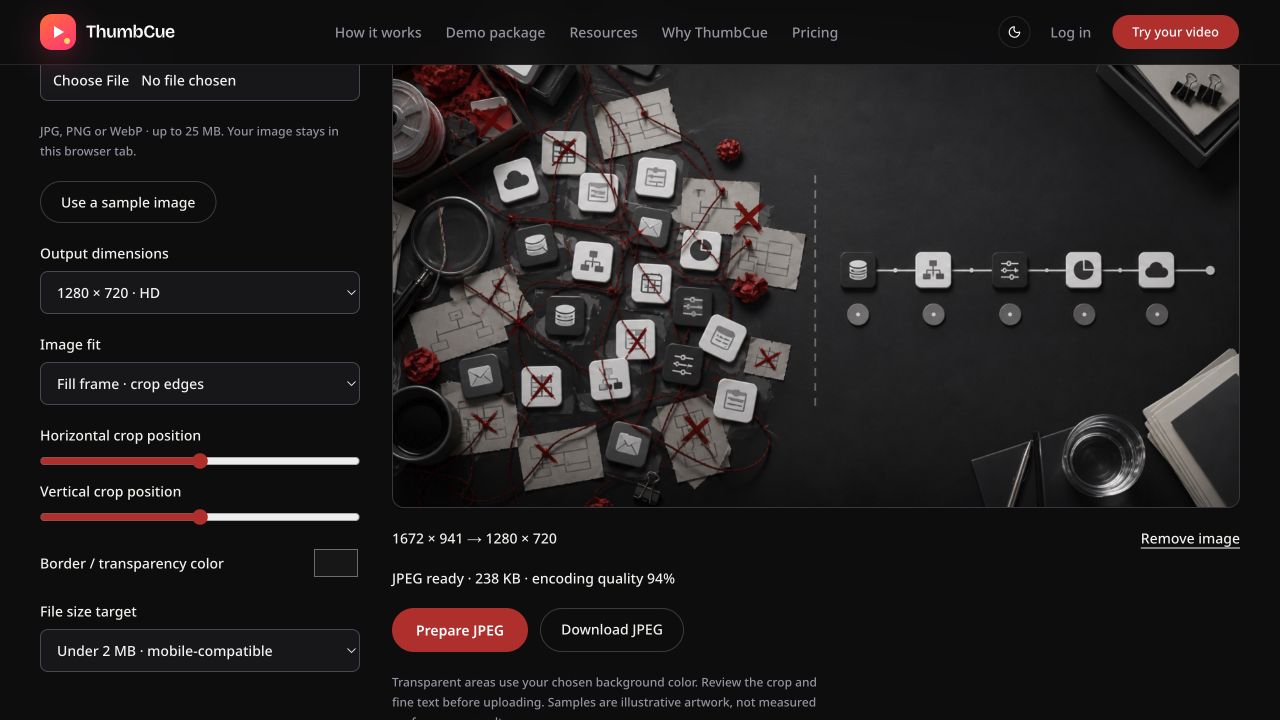
Open the resizer and press “Use a sample image.” Its built-in sample is the proof artwork. Choose 1280 × 720 · HD, Fill frame · crop edges and the under-2-MB target. We used the centered crop.
5. Download and inspect
Press “Prepare JPEG,” then “Download JPEG.” Our downloaded file was verified as JPEG, 1280 × 720 and 237,223 bytes. The tool displayed about 238 KB at 94% encoding quality. File sizes can vary by browser.
6. Keep the decision separate from the evidence
The file is ready for review; it has not been published to YouTube or tested against an audience. Keep the alternate directions and record why you chose this one before collecting real performance data.

The two free tools work without an account. Images and edited titles clear when you leave their tab; the preview does not automatically transfer a project or title into the resizer.
Decision
Which package wins?
There is no universal winner without channel and audience data. For a cold audience, the outcome direction is the clearest entry point because it combines a transformation with a concrete time constraint. For viewers already struggling with tool overload, the tension direction may feel more immediately relevant. For an established audience that trusts the creator, the 30-day proof direction can carry more weight.
The important result is not “three thumbnails.” It is three inspectable hypotheses. Each package says who it is for, which source fact it uses, and what it trades away.
Publish one, document why, and compare the result against traffic source and retention. Do not treat CTR as the only measure of a successful promise.